What Is an AI Agent in a Business Context?
An AI agent is not just a chatbot. It is a digital team member that can understand goals, make decisions, and take action across your systems, 24x7. Here is how the architecture works and where it drives real business value.
An AI agent is not just a chatbot. It is a digital team member that can understand goals, make decisions, and take action across your systems, 24x7.
Where traditional automation waits for a trigger and then runs a fixed rule ("if this happens, do that"), an AI agent can interpret messy input, plan multi-step tasks, call the right tools (CRM, finance, ticketing, messaging), and loop a human in when needed. It behaves much more like a junior operations manager than a script.
For business leaders, the key shift is this: your systems stop waiting for people to log in and push buttons. Instead, an always-on agent quietly runs intelligent workflows in the background, aligned to your goals and policies.
Inside the AI Agent Architecture
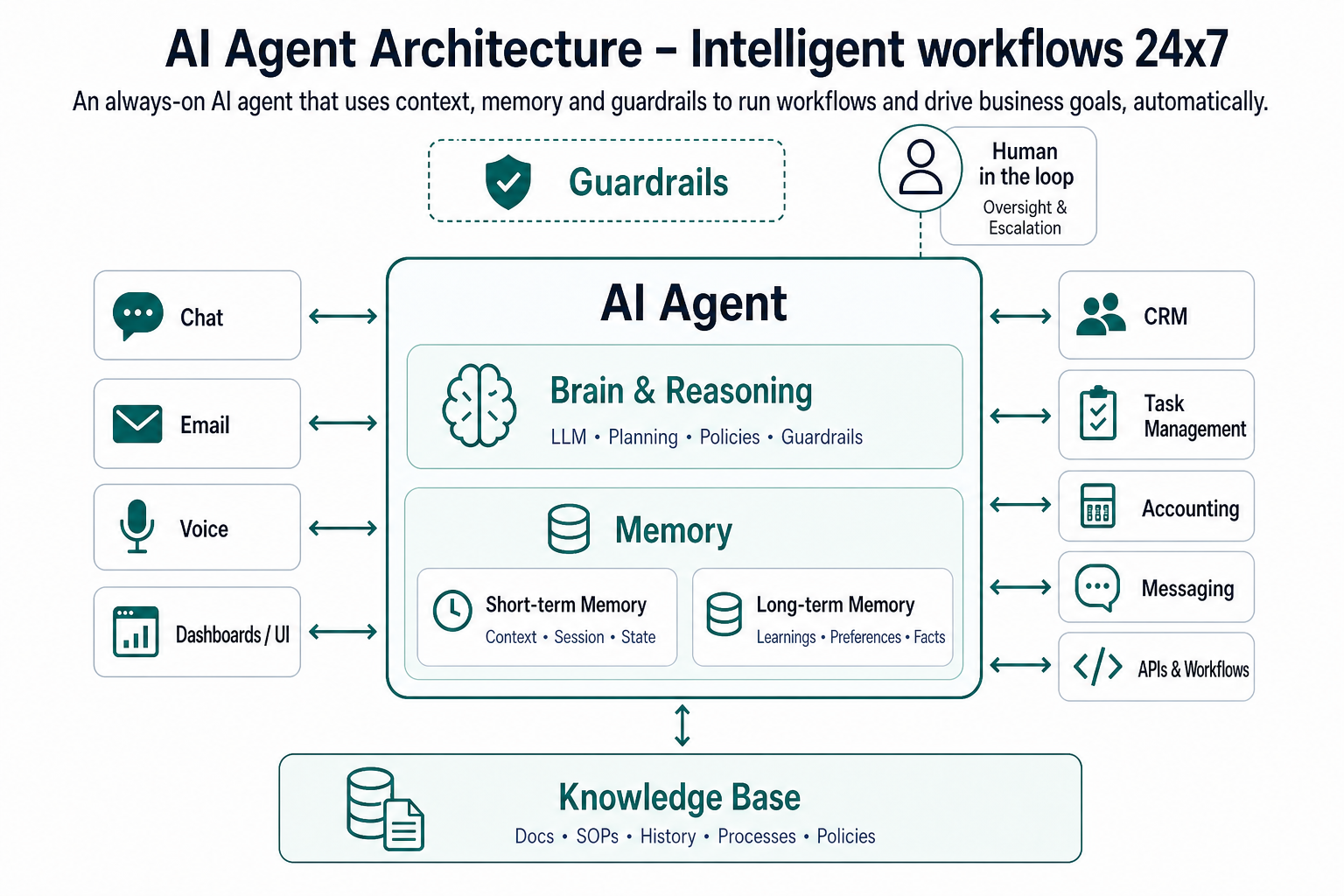
Your AI agent architecture diagram tells the story visually. Here's how to explain it in plain English.
1. Perception & Interfaces – How the Agent Talks and Listens
At the top left of the diagram, you'll see multiple interface boxes: chat, email, voice and dashboards/UI.
These show the different channels where people and systems interact with the agent. Whether a client sends an email, a staff member uses a web chat, or a manager works from a dashboard, the agent is listening.
The important part: it turns unstructured input ("Can you move that job to tomorrow?" or "What's the status of invoice 123?") into structured intent it can act on.
2. The AI Agent – Brain, Reasoning and Memory
In the centre is the main AI Agent box. Inside it are two key components:
- Brain & Reasoning – powered by an LLM and planning logic, guided by your policies and guardrails.
- Memory – a combination of short-term (current interaction) and long-term (history across clients, jobs, tickets, etc.).
This is where the agent:
- Understands the intent of a request.
- Breaks goals into steps.
- Chooses which tools to use and in what order.
- Remembers what happened last time with this customer, account or process.
Because it uses memory and context, the agent doesn't treat every interaction like "the first time we've met".
3. Knowledge Base – The Business Brain It Stands On
Directly beneath the agent is the Knowledge Base layer. This includes:
- Docs
- SOPs
- History
- Processes
- Policies
In other words, your playbooks and institutional knowledge.
The agent doesn't invent how your business should work. It pulls from this knowledge base and your live systems, so its decisions match your processes, service standards and compliance obligations.
4. External Tools & Systems – Where Work Gets Done
On the right side of the diagram sit several generic system boxes, such as:
- CRM
- Task Management
- Accounting
- Messaging
- APIs & Workflows
These represent the systems where actual work happens: updating records, creating tasks, sending emails, logging tickets, triggering automations.
The arrows between the AI agent and these systems go both ways. That matters:
- The agent reads from systems (current status, data, history).
- The agent writes to systems (updates, new records, actions taken).
That's what turns it from a "talking head" into a genuine business operator.
5. Guardrails and Human-in-the-Loop
Somewhere on the agent you'll see Guardrails and an indicator for Human in the loop. These show that:
- The agent operates inside clearly defined boundaries – what it can do, what needs approval, what data it can access, and what tone it should use.
- For edge cases or high-risk decisions, the agent hands off to a person with full context, rather than acting blindly.
The result: you get the best of both worlds – speed and scale from the agent, judgment and nuance from your people.
Five Common AI Agent Use Cases
You can map each of these use cases straight back to the architecture: interfaces → agent (brain + memory) → tools → knowledge base.
1. 24x7 Customer Service & Support
The agent handles common customer questions, status checks and basic troubleshooting via chat, email or phone. When it can't resolve something, it creates or routes tickets to the right team with all relevant context attached.
Impact: reduced wait times, lower ticket volume, and your human agents focusing on complex or sensitive cases.
2. Lead Qualification and Appointment Booking
A front-door agent responds to web enquiries, emails and missed calls automatically. It asks qualifying questions, updates the CRM, and books appointments or jobs directly into calendars.
Impact: no more lost leads, faster response times, and a consistent qualification process based on your own criteria.
3. Back-office Workflow Automation (Billing, Invoicing, Admin)
The agent reads emails and documents, extracts key data, and drives tasks such as invoice creation, payment reminders and approvals. It follows your documented processes and policies from the knowledge base rather than relying on someone remembering each step.
Impact: fewer manual admin tasks, fewer errors, and smoother cashflow.
4. Internal IT / HR / Ops Helpdesk
Staff ask the agent questions about policies, leave, pay, tools, and basic IT issues through chat or email. The agent answers from your internal knowledge base and, if needed, creates and routes tickets to the relevant team.
Impact: less interruption of senior staff, faster answers for employees, and better use of your existing documentation.
5. Monitoring, Alerting and Incident Response
The agent keeps an eye on important metrics and systems – integration failures, SLAs, job queues, error spikes, low inventory, and more. It raises alerts, suggests actions, and can trigger predefined remediation workflows without waiting for a human to notice the issue in a dashboard.
Impact: problems are caught earlier, responses are faster, and your operations become more proactive.
Why This Matters for Business Leaders
For owners, CEOs and operations leaders, the technology is secondary. The real value of an AI agent architecture like this is in how it changes the way your business runs and the outcomes you can measure.
Revenue and growth outcomes
- Higher lead conversion: Faster, 24x7 responses mean fewer "ghosted" enquiries and more first meetings booked while competitors are still sleeping.
- Better upsell and cross-sell: Agents can systematically follow up quotes, expiring contracts and dormant accounts, not just the squeaky wheels your team remembers.
- More consistent sales process: Every prospect is qualified against the same criteria and moved through the same steps, which makes your pipeline more predictable and easier to scale.
Profitability and margin outcomes
- Lower labour cost per task: A large chunk of repetitive admin, chasing, and status updates is handled by the agent, so humans move up the value chain instead of you hiring "another pair of hands" for low-value work.
- Fewer rework and errors: The agent follows the documented process the same way every time, reducing expensive mistakes in billing, scheduling, compliance, and customer communications.
- Better utilisation of specialist staff: Your highest-paid people spend more time on diagnosis, design and client conversations, and less time pushing data between systems.
Customer experience and retention outcomes
- Faster response times: Clients get answers and acknowledgements immediately, even outside business hours, which directly improves perceived reliability and professionalism.
- More proactive service: Agents can spot patterns (e.g. repeated issues, missed renewals, delayed jobs) and trigger outreach before the client complains or churns.
- Consistent quality: Every customer interaction is grounded in your best practice playbooks, not who happened to pick up the phone that day.
Operational resilience and scalability
- Less key-person risk: Critical knowledge lives in the agent's knowledge base and workflows, not just in the heads of a few long-tenured staff. When someone leaves, the brain doesn't walk out the door.
- Easier to scale locations and teams: When your "operating system" is encoded in AI-driven workflows, opening a new branch or adding a new team becomes a deployment problem, not a reinvention.
- Better incident response: Agents monitor metrics and systems continuously, raise alerts early, and trigger standard responses, so you get fewer nasty surprises.
Governance, compliance and risk management
- Embedded policies and guardrails: Compliance rules, approval thresholds and communication guidelines are built into the agent, so they're followed by default instead of relying on memory and training alone.
- Better audit trail: Every action the agent takes can be logged with who, what, when and why, giving you stronger evidence and easier reporting for regulators, boards and insurers.
- Safer experimentation: You can roll out new workflows or service models behind guardrails and "human in the loop" checkpoints, learning quickly without losing control.
Leadership leverage and strategic focus
- More time "on" the business: With agents handling a growing slice of the operational grind, leaders can focus on strategy, partnerships, new offerings and culture instead of permanent firefighting.
- Clearer decision-making: Always-on agents can surface real-time operational signals and summaries, giving leaders a sharper view of what's working and what's slipping.
- A path to a self-managing enterprise: Over time, more of your day-to-day is run by intelligent, policy-driven workflows, so the business becomes less dependent on your constant presence to function.
Put simply: an "AI Agent Architecture – Intelligent workflows 24x7" is not just a tech diagram. It is a blueprint for shifting from a people-dependent operation to a self-managing, intelligent operating system that grows, adapts and executes with you and for you.